

Identity theft is one of the most serious threats on the modern internet. Attackers can steal your logins, passwords, bank card numbers, passport details, and then use them for fraud, blackmail, or sell them on the dark web. A VPN (Virtual Private Network) is often marketed as a universal shield against all evils, but is that really true?
In this article, we’ll examine exactly which threats a VPN protects against, where it is truly indispensable, and where it falls short. You’ll learn how to combine a VPN with other tools to achieve maximum protection for your personal data.
What a VPN protects

Encrypts traffic, hides your IP address, secures public networks, and prevents ISP surveillance.
Where a VPN fails

Does not protect against phishing, malware, weak passwords, or account breaches through website vulnerabilities.
Key threats
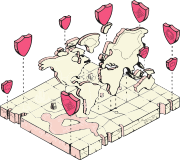
Wi-Fi eavesdropping, DNS leaks, ISP tracking, data breaches on servers.
KelVPN — your ally

Decentralized network, quantum-resistant encryption, zero-logs, Kill Switch.
Part 1. How a VPN protects your personal data
Before discussing limitations, it’s important to understand what a VPN does well.
1.1. End-to-end traffic encryption
When you connect to a VPN, an encrypted tunnel is established between your device and the VPN server. All your internet traffic (passwords, messages, card details) is turned into unreadable code. Even if an attacker intercepts packets on a public Wi-Fi network, they will see only meaningless gibberish. This makes classic sniffing — passive data interception — impossible.
1.2. Hiding your real IP address
Your IP address is a digital “pass” that reveals your location, ISP, and sometimes even your home address. A VPN replaces your real IP with the server’s IP. This makes it difficult to tie your online activity to your identity and also protects against DDoS attacks, which often begin with an IP discovery.
1.3. Protection on public networks
Cafés, airports, shopping malls — these are hackers’ favorite hunting grounds. Open Wi-Fi networks are practically unprotected. A VPN turns even the most insecure connection into a private channel that cannot be eavesdropped on from within the same network.
1.4. Countering ISP surveillance
Your Internet Service Provider (ISP) normally sees every site you visit and may collect and even sell that data. A VPN hides this information from your ISP, keeping your activity private.
Part 2. Where a VPN does not protect (and what to do instead)
It’s essential to understand that a VPN is not a silver bullet. It closes some attack vectors but leaves others wide open.
2.1. Phishing (fake websites)
A VPN does not analyze website content. If you click a link that leads to a perfect copy of your bank’s portal and enter your credentials, they will go straight to the fraudster. VPN encryption is useless here because you voluntarily give away your information. What to do: always check the address bar, use password managers, and never click suspicious links.
2.2. Malware (viruses, Trojans, keyloggers)
A VPN does not scan downloaded files or block malware installation. If a Trojan ends up on your device, it can steal data after it is decrypted on your device. What to do: use antivirus software, avoid downloading files from untrusted sources, and keep your programs updated.
2.3. Weak or compromised passwords
A VPN does not help if you reuse the same simple password across multiple sites. Attackers can obtain your password from a data breach and then log into your accounts even if you used a VPN. What to do: use unique, complex passwords, a password manager, and enable two-factor authentication (2FA).
2.4. Vulnerabilities of websites and services
Even if your connection is secure, your data can be stolen from the database of the company you entrusted it to. A VPN cannot prevent a server-side breach. What to do: avoid storing unnecessary information on websites, use virtual cards for payments, and change passwords regularly.
2.5. Social engineering
Criminals can trick you into handing over your data (a phone call pretending to be your bank, a fake email). A VPN is powerless here because the attack happens outside the technical realm. What to do: be skeptical of unexpected calls and messages, never share verification codes or passwords with anyone.
2.6. Leaks via DNS, WebRTC, and IPv6
Even with a VPN enabled, some requests may “leak” outside the tunnel, exposing your real IP. This happens if the VPN is not configured correctly. What to do: choose a VPN with built-in leak protection. KelVPN includes DNS, IPv6, and WebRTC leak prevention.
2.7. Data collection by the VPN provider itself
If a VPN service keeps logs, it can itself become a source of leaks. Free VPNs often collect and sell user data. What to do: select a VPN with a strict zero-logs policy, such as KelVPN.
Part 3. Comparison: VPN and other identity protection tools
For full protection, a multi-layered approach is essential.
| Threat | VPN | Antivirus | Password Manager | 2FA |
|---|---|---|---|---|
| Wi-Fi traffic interception | Yes | No | No | No |
| Phishing | No | Partial (blocking) | Yes (auto-fill) | No |
| Malware | No | Yes | No | No |
| Weak passwords | No | No | Yes | Yes (login protection) |
| Server-side data breach | No | No | Yes (password change) | Partial |
Part 4. How to strengthen your protection: recommendations
- VPN + Kill Switch: use a VPN with an emergency cut-off feature so that even if the connection drops, your data doesn’t leak. KelVPN’s Kill Switch is always on and cannot be disabled.
- Antivirus with phishing protection: choose solutions that block suspicious websites.
- Password manager: generate unique, complex passwords for each service and store them encrypted.
- Two-factor authentication (2FA): enable it wherever possible. Use authenticator apps (Google Authenticator, Authy) or hardware keys.
- Regularly check for breaches: use services like Have I Been Pwned to see if your accounts have been compromised.
- Avoid storing excessive data on websites: do not save payment details on online stores unless absolutely necessary.
Part 5. Why KelVPN is a reliable choice for data protection
KelVPN was built with a strong focus on privacy and security.
- Decentralized network: no single server to hack or block.
- Quantum-resistant encryption: your data is protected against future quantum computer attacks.
- Zero-logs policy: we do not store information about your connections, IP addresses, or activities.
- Leak protection: built-in mechanisms prevent DNS, IPv6, and WebRTC leaks.
- Permanent Kill Switch: the emergency internet cut-off is always active and cannot be turned off.
- Cross-platform support: protect your data on any device — from PC to Raspberry Pi.
Part 6. Frequently Asked Questions
Glossary
- Identity theft: the unauthorized use of someone else’s personal information for fraudulent purposes.
- Phishing: a type of fraud where fake websites are created to steal logins and passwords.
- Sniffing: interception of network traffic to extract data.
- Throttling: intentional speed reduction by an Internet Service Provider.
- DNS leak: when DNS requests are sent outside the VPN tunnel.
- WebRTC leak: exposure of your real IP through browser WebRTC connections.
- Kill Switch: a feature that automatically cuts off internet access if the VPN disconnects.
- Zero-logs: a policy where the service stores no user activity data.
Conclusion
A VPN is a powerful tool for protecting personal data, but it is not omnipotent. It reliably addresses threats related to traffic interception and surveillance, but it does not protect against phishing, malware, or weak passwords. Only a comprehensive approach — VPN + antivirus + password manager + two-factor authentication + digital hygiene — ensures maximum security. KelVPN provides a solid foundation: a decentralized network, quantum-resistant encryption, a zero-logs policy, and a built-in Kill Switch. Use it as part of your security strategy, and your personal data will be in safe hands.